Building an industrial-scale energy conversion is what separates hyperscale data center design from the traditional systems that came before it.
The old rules about rack spacing and CRAC unit placement still apply, but they now give way to a much larger engineering problem: how do you safely and efficiently convert megawatts of utility power into computation, then remove the resulting heat, all while maintaining five-nines uptime in a building that never stops growing?
This guide walks through the engineering fundamentals that matter when you're designing data center infrastructure at hyperscale.
The Current Constraint for Building Data Centers
For years, scaling data centers was framed as an engineering problem to optimize power distribution, improve cooling efficiency, and design for higher density. But that assumption is starting to break.
Across major markets, data center expansion is now running into limits that have nothing to do with design. The constraint isn’t just how efficiently you can build; it’s whether you can get the infrastructure to build at all.
Almost 50% of data centers planned in the US are now expected to be delayed or canceled, not because of funding or demand, but due to shortages of critical electrical equipment such as transformers, switchgear, and grid infrastructure.
This creates a new kind of engineering challenge. You’re no longer designing in a vacuum where components are readily available. You’re designing systems that need to account for procurement delays, phased deployment, and infrastructure bottlenecks that sit outside the data hall.
The question isn’t just how to design for scale anymore. It’s about designing for scale when the supply chain itself becomes the constraint.
What Makes Hyperscale Data Centers Different From Enterprise Ones?

This constraint doesn’t replace the fundamentals of hyperscale data center design and infrastructure, but it changes how you approach them. The term "hyperscale" gets thrown around loosely, but from an infrastructure standpoint, it has a specific meaning: facilities designed to scale horizontally across thousands of racks while maintaining operational efficiency as density increases.
Support for Growth
The core difference lies in the relationship among power, cooling, and physical growth. In a traditional enterprise data center, you design for a fixed capacity, like 500 racks at 8kW average, maybe 12kW peak. You install cooling and power distribution to match and add 20% buffer. Hyperscale facilities are built differently.
In hyperscale data center infrastructure, you're designing for continuous expansion where each deployment phase might add 2MW of IT load, and the infrastructure needs to support that growth without requiring you to rip out and replace what you built six months ago. This means your electrical distribution, cooling architecture, and even structural systems need to accommodate future states you can't fully predict yet.
Density Trajectory
The second major difference is density trajectory. Enterprise facilities tend to hover around stable power draws, with virtualization and efficiency gains roughly offset the move to denser processors. Hyperscale environments see consistent upward pressure on rack density.
What starts as a 15kW average rack deployment can climb to 25kW or 40kW as you refresh hardware, adopt GPU-heavy workloads, or migrate to liquid cooling. Your infrastructure needs to handle that climb without major retrofits.
Operational Model
Finally, there's the operational model. Enterprise facilities often go dark for planned maintenance. Hyperscale doesn't.
Every system, from UPS modules to chilled water loops, needs N+1 redundancy minimum, and in many cases N+2 or 2N for critical paths. If you can't fully maintain a cooling plant while staying online, you don't actually have redundancy.
How Do You Design Electrical Infrastructure for Heavy-Duty Racks?
Electrical infrastructure is where supply constraints become operational risks for the hyperscale data center designs. You can't just scale up the electrical approach that worked for 8kW racks. There needs to be a change in the fundamentals.
Busway Cable
For high-density environments, modular busway distribution starts to offer a clear ROI at the ~20kW per rack threshold, and becomes increasingly important as rack densities scale toward 40kW+ environments due to the physical density limits of traditional cabling.
Traditional overhead whip drops work fine when you're pulling 20-30 amps per rack. At 40kW on 208V three-phase, you’re pulling approximately 111 Amps per phase. While manageable for a single circuit, scaling this across a data hall leads to 'tray congestion,' where the cumulative weight and bend radius requirements of large-gauge copper (like AWG 1 or 1/0) exceed the physical capacity of overhead cable trays.
Busway solves this by moving the distribution backbone closer to the load. Instead of home-running every rack to a remote PDU, you run a high-capacity busway spine down the hot aisle (or cold aisle, depending on layout), and tap off with short whips at each rack position. A single busway run can carry 400-800 amps continuously, feeding 10-20 high-density racks from one distribution point.
This advantage shows up during expansion. With traditional whip distribution, adding racks means pulling new conduit and cable from the electrical room. With the busway, you're just installing another tap-off plug. This cuts deployment time from days to hours and eliminates the coordination headaches of having electricians working above live equipment.
Drawbacks:
That said, the busway has higher upfront costs, about 30-40% more than equivalent cable runs for initial deployment. It pays back through reduced installation labor on subsequent phases and lower retrofit costs when you inevitably need to increase capacity.
If you're building a single-phase facility with no growth plans, cable distribution is still the right call. But if you're designing for hyperscale growth, busway should be your default for anything above 25kW average rack density.
Three-Phase Power
Everyone knows three-phase power is more efficient than single-phase, but the operational advantages in high-density environments go beyond electrical engineering.
The obvious benefit is reduced conductor size. For the same power delivery, three-phase lets you use smaller gauge wire because you're spreading the load across three conductors instead of two.
But the bigger win is voltage stability under load. Single-phase circuits experience larger voltage swings as equipment powers on and off. In a hyperscale environment where you're constantly provisioning new servers or running maintenance, those swings add up.
Three-phase distribution naturally balances load transients across three legs, significantly reducing Total Harmonic Distortion (THD). This provides cleaner power delivery and reduces the heat-related stress on upstream UPS inverters and transformers, which is critical for maintaining high efficiency (PUE) at scale.
There's also a practical advantage around rack-level redundancy. Most modern server PSUs can accept both single-phase and three-phase input, but three-phase lets you feed dual-corded servers from separate phases on the same PDU.
In high-density deployments, three-phase power allows for streamlined A+B redundancy. By utilizing dual-corded server PSUs connected to separate three-phase PDUs, the system maintains 100% uptime even if a single phase or an entire upstream power grid fails.
With single-phase distribution, you need physically separate PDUs to achieve the same redundancy, which doubles your distribution infrastructure.
Drawbacks:
The downside is complexity. Three-phase requires more careful load balancing across phases, and your electrical team needs to be comfortable working with it. But in hyperscale environments, that complexity is table stakes. If you're not designing for three-phase distribution at the rack level, you're deliberately choosing a less efficient, less resilient approach to save on engineering hours upfront.
What's the Right Cooling Architecture for Mixed-Density Data Center Deployments?
Since your facility will never have a uniform density, you'll need racks running at 8kW sitting next to racks pulling 40–60kW in high-density AI environments, and your cooling infrastructure needs to handle both without creating hot spots or wasting energy on overcooling low-density zones.
In-Row Cooling vs. Perimeter CRAC
Traditional perimeter CRAC units work by creating a pressurized cold aisle using an underfloor plenum. Cold air flows up through perforated tiles, equipment pulls it through, and hot air exhausts into the hot aisle where return plenums route it back to the CRAC.
Traditional perimeter cooling begins to face airflow and efficiency limitations as rack densities exceed ~15–20kW, where air delivery requirements increase significantly, especially without containment or supplemental cooling.
The failure mode is a matter of fluid dynamics: standard perforated floor tiles typically deliver between 300 and 500 CFM at standard static pressures. However, according to Dell’s thermal guidelines for high-density compute, a modern 15kW rack requires approximately 2,000 to 2,400 CFM to maintain safe inlet temperatures and prevent "hot spots" caused by air recirculation. And ASHRAE TC9.9 guidelines emphasize that airflow must be dynamically matched to equipment load, rather than sized for peak airflow, to avoid inefficiencies and thermal risks.
In a hyperscale environment, trying to push that volume of air through a single floor tile results in high-velocity turbulence and "bypass air," where the cold air overshoots the server intakes entirely. At the 20kW+ threshold, the volume of air required exceeds the physical capacity of the floor plenum itself.
This is why hyperscale designs are pivoting toward in-row cooling or direct-to-chip liquid cooling, by bringing the cooling medium inches away from the processors rather than fighting the physics of underfloor air distribution.
When Does Liquid Cooling Actually Make Sense?
Direct liquid cooling gets a lot of hype, especially around AI workloads, but it's not a universal solution. As rack densities move beyond ~20kW and into the 40–60kW range, advanced cooling solutions such as liquid cooling become necessary to maintain performance and efficiency.
At this density, the energy required by high-RPM server fans to move air effectively starts to cannibalize the facility’s power budget, making liquid-to-chip heat transfer more efficient.
Air cooling can support rack densities up to around 20kW, but beyond that, it can struggle to keep up with rising thermal demands in high-density environments. You can push higher with aggressive in-row cooling and hot aisle containment, but you're fighting diminishing returns. The airflow requirements become extreme, noise levels climb, and you're spending massive amounts of energy moving air around. At some point, it's cheaper to remove heat directly at the source using liquid.
The case for liquid cooling strengthens when you look at chip-level power density. A modern GPU can dissipate hundreds of watts per chip in a package the size of your palm. Air cooling that requires enormous heatsinks and high-velocity fans.
Liquid cooling uses cold plates that sit directly on the chip, removing heat with minimal temperature delta and almost no noise. For AI training clusters or HPC workloads, this isn't optional; you literally can't cool the hardware any other way.
But here's what the vendor whitepapers don't emphasize: liquid cooling adds operational complexity you need to account for. You're now managing coolant chemistry, leak detection, and fluid distribution networks in addition to your normal data center systems. Every rack needs quick-disconnect couplings, manifolds, and leak containment. Your maintenance staff needs different skills.
Operational risk is higher with liquid cooling; if a Coolant Distribution Unit (CDU) fails, high-density chips lack the thermal mass for air-cooled fallback. Without active fluid flow, these systems will trigger a critical thermal shutdown in seconds, not minutes, necessitating redundant pumps and secondary cooling loops at the rack level.
The hybrid approach, with liquid cooling for high-power components like CPUs and GPUs, and air cooling for everything else in the rack, tends to make the most sense for mixed workloads. You get the thermal performance where you need it without converting your entire facility to a liquid-cooled architecture. But you pay for that flexibility in complexity. Now you're managing two cooling systems, and you need data center infrastructure to support both.
How Do You Build Redundancy Without Doubling Your Budget?
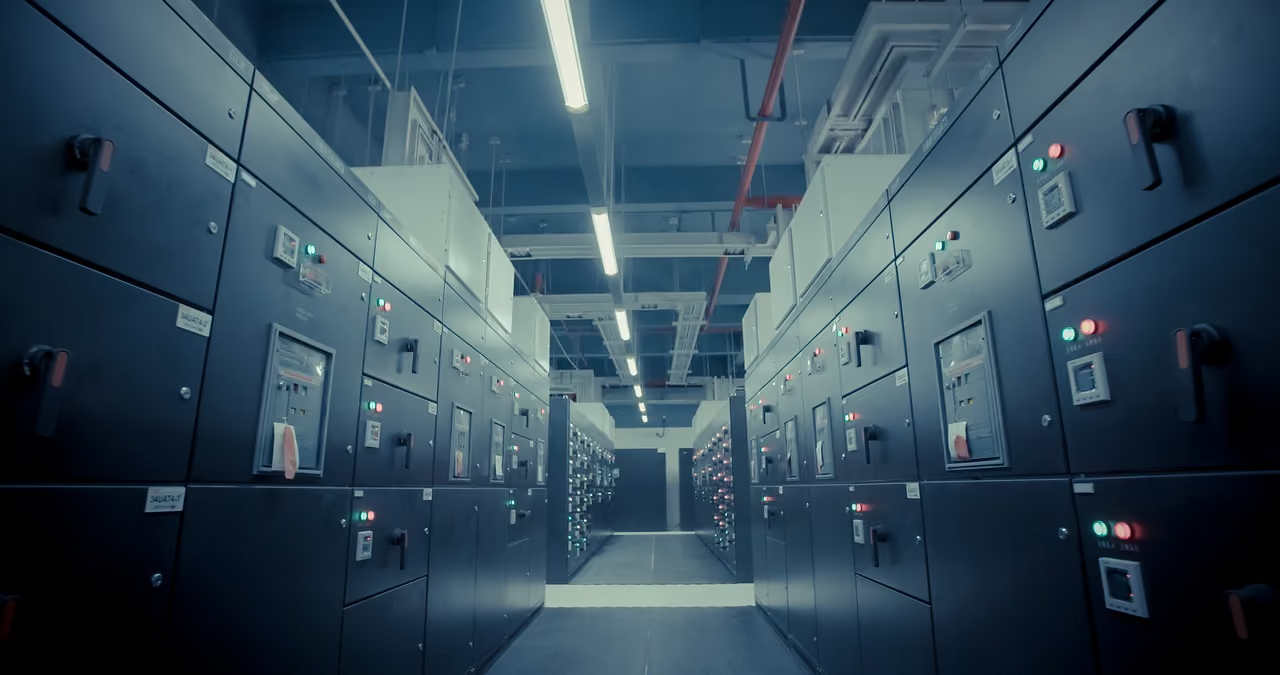
In a constrained environment, redundancy is necessary to create a resilient supply and infrastructure for hyperscale data centers.
While N+1 provides a baseline for component-level maintenance, true hyperscale reliability often requires 2N redundancy to eliminate single points of failure across entire distribution paths. This ensures that a failure in one utility feed or cooling loop doesn't trigger a cascading outage.
To create this, start with your critical path analysis. Map out every system between utility power and server inlet, like transformers, switchgear, UPS, PDUs, busway, cooling plants, pumps, and piping. Any component whose failure would cause an outage is a single point of failure.
In high-density environments, electrical redundancy relies on A/B power distribution. Dual-corded servers utilize independent power supply units (PSUs) fed from separate UPS systems and distribution paths, allowing for Fault Tolerant (2N) operation where one entire path can go dark without affecting server availability.
But from the UPS forward, you want separate paths. If a UPS module fails or needs maintenance, the other path carries the full load without interruption.
Cooling redundancy is trickier because you can't hot-swap a chiller the way you can a UPS module. The standard approach is N+1 at the plant level. If you need three 500-ton chillers to handle the full load, you install four. During maintenance, you take one offline and run on the remaining three. This works, but it's capital-intensive.
Nowadays, cooling redundancy at hyperscale datacenters is moving beyond simple N+1 chiller counts toward Concurrently Maintainable architectures. This involves redundant piping headers and 'swing' pump configurations that allow any single valve, pump, or chiller to be isolated for repair without interrupting the thermal management of the live data hall.
A more cost-effective approach for phased deployments is to size your initial cooling plant with headroom, then add capacity as you grow. You get redundancy for your current load, and you've pre-built the expansion path for future growth. The key is making sure your distribution infrastructure, like the piping, pumps, and controls, can support the future state without major rework.
The most common architectural pitfall in designing hyperscale data center infrastructure is confusing redundancy with overcapacity. Running chillers at 50% load (150% of total capacity) may feel safe, but if those units share a single-threaded PLC (Programmable Logic Controller) or a non-redundant pump manifold, the system remains vulnerable to a single point of failure (SPOF) crash.
Why Modular Data Center Infrastructure Saves More Than Construction Time
When infrastructure availability becomes unpredictable, modular systems become one of the few ways to maintain deployment speed. Pre-engineered modular systems are about de-risking the integration work that kills most hyperscale projects.
Common Points of Failure
When you're coordinating electrical, cooling, controls, and structural systems across multiple vendors, the integration layer is where things fall apart. The chiller manufacturer assumes someone else is providing vibration isolation. The electrical contractor assumes the busway vendor coordinated the floor loading.
The controls integrator discovers that none of the BACnet points match the specification. Six months into construction, you're arbitrating conflicts and watching your schedule slip.
Shifting Integration Upstream
Modular systems shift that integration work upstream to the factory. A pre-engineered chilled water plant arrives as a complete skid with pumps, valves, controls, and isolation all mounted and tested. The electrical distribution comes as a tested assembly with busway, panels, and monitoring pre-wired. You're not eliminating complexity, instead you're moving it to a controlled environment where problems are cheaper and faster to solve.
Replication of Designs
The other advantage is repeatability. Once you've validated a modular design for phase one, you can replicate it exactly for phases two through ten. You're not re-engineering the cooling plant every expansion cycle. You're ordering another pre-tested module and dropping it in place.
This compounds over time, and your operators learn one system instead of five different chiller configurations, your spares inventory shrinks, and troubleshooting gets faster.
Upfront Costs & Long-Term Savings
While modular units may sometimes carry a higher sticker price per unit, standardized factory production and bulk procurement can reduce total capital spending by 10% to 20% compared with the overhead of traditional stick-built construction.
But you save that back through compressed schedules, reduced field labor, and fewer change orders. More importantly, you reduce risk. A factory-tested module has a much lower probability of commissioning failures than field-assembled systems where you're discovering integration issues in real-time.
Built for Scale, Designed for What Comes Next
Today’s data center infrastructure isn’t just about meeting today’s load. You need to stay ahead of your facility’s demands. That’s where Wootz.work operates differently.
Rather than treating power, cooling, and structural systems as isolated components, the approach is integrated from the ground up. Modular systems, pre-engineered assemblies, and validated design packages ensure that what is deployed on-site has been tested for performance, scalability, and reliability. This means your data center infrastructure can handle higher densities, evolving workloads, and phased expansion, without constant redesign or operational disruption.
Here’s a snapshot of what this looks like in practice:
- Custom-fabricated components and skid-mounted systems for data centre builds
- High-efficiency HVAC and chilling systems, including CRAC and in-row cooling
- Advanced fire protection and suppression systems for mission-critical environments
- Server racks, cabinets, and enclosures designed for airflow and scalability
- Modular interior infrastructure, including raised flooring and cable management systems
FAQs

.svg)